Available now for macOS

Your Mac's most useful blind spot.

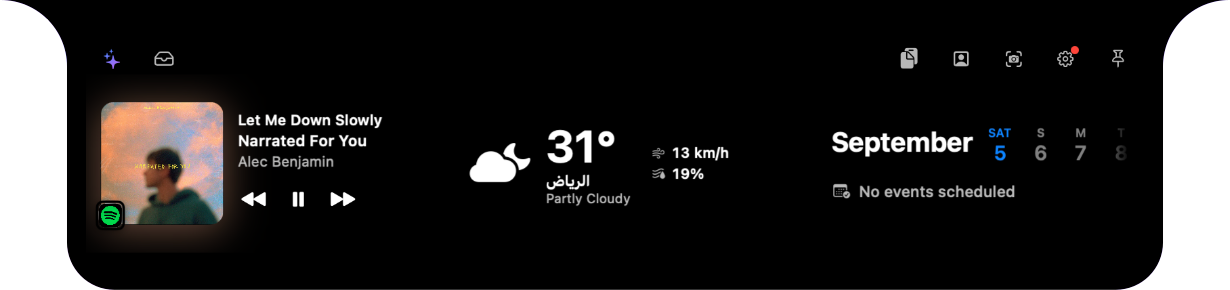
Build your own dashboard inside the notch. Music, clipboard history, files, screenshots, weather, and timers—arranged the way you want them, and gone the moment you look away.

macOS 14 or later · Apple notarized · Updates built in

9:41⌁   ◔   87%
HomeWork
MediaMidnight CityM83
Weather24°Mostly clear
CalendarTue 6No events today
One glance.Everything you need.

Interactive preview · Tap a feature

Everything, one glance away

A small space.A surprisingly useful place.

The essentials stay within reach, then disappear when you do not need them. No clutter. No new workflow to learn.

01

Your pages, your widgets

Build up to ten pages and fill each one yourself. Every widget comes in three real designs—small, medium, and wide—so it looks right at any size, never stretched.

02

Now Playing

See what is playing and control audio across your Mac without leaving your current app.

03

Clipboard History

Everything you copy—text, images, and files—kept in reach. Click once to copy it back.

04

Temporary Shelf

Drop files into the notch, keep them close while you work, then clear them when you are done.

05

Focus Timer

Start a clean, glanceable timer that stays visible without getting in your way.

06

Screenshot Studio

Draw a region, resize it before you shoot, then dress the result with padding, rounded corners, shadow, and a gradient backdrop. Copy it or save a PNG.

07

Local Weather

Get current conditions automatically for your location, right where you already look.

08

Every Display

Use the island on your Mac's built-in screen and across connected external displays.

Pricing

Buy it once.Or rent it by the month.

One license unlocks every widget, every page, and every update. No account to create, no data to hand over.

Monthly

$4per month

Try the whole thing, cancel anytime.

One Mac

  • Every feature, unlocked
  • Updates while subscribed
  • Cancel in one click
Download and activate

Download the app first and use it right away—your license key activates it from inside Settings.

Privacy, by default

Your island stays yours.

Your files, clipboard, timers, and preferences stay on your Mac. No account required. Network access is used only when a feature needs it, such as retrieving weather data or checking for a new version.

  • Local-first storage
  • No account required
  • Only essential permissions
Swift · No Electron

Native, all the way down

Built in Swift, not wrapped in a browser.

No bundled Chromium, no hidden web view. Signed, notarized by Apple, and light enough on memory that you forget it is running.

  • Signed & notarized
  • Updates in place
  • macOS 14 or later

Made for macOS

One glance.
Everything you need.

Thoughtfully designed for the way you already use your Mac.

Download for Macv1.0.3 · macOS 14 or later